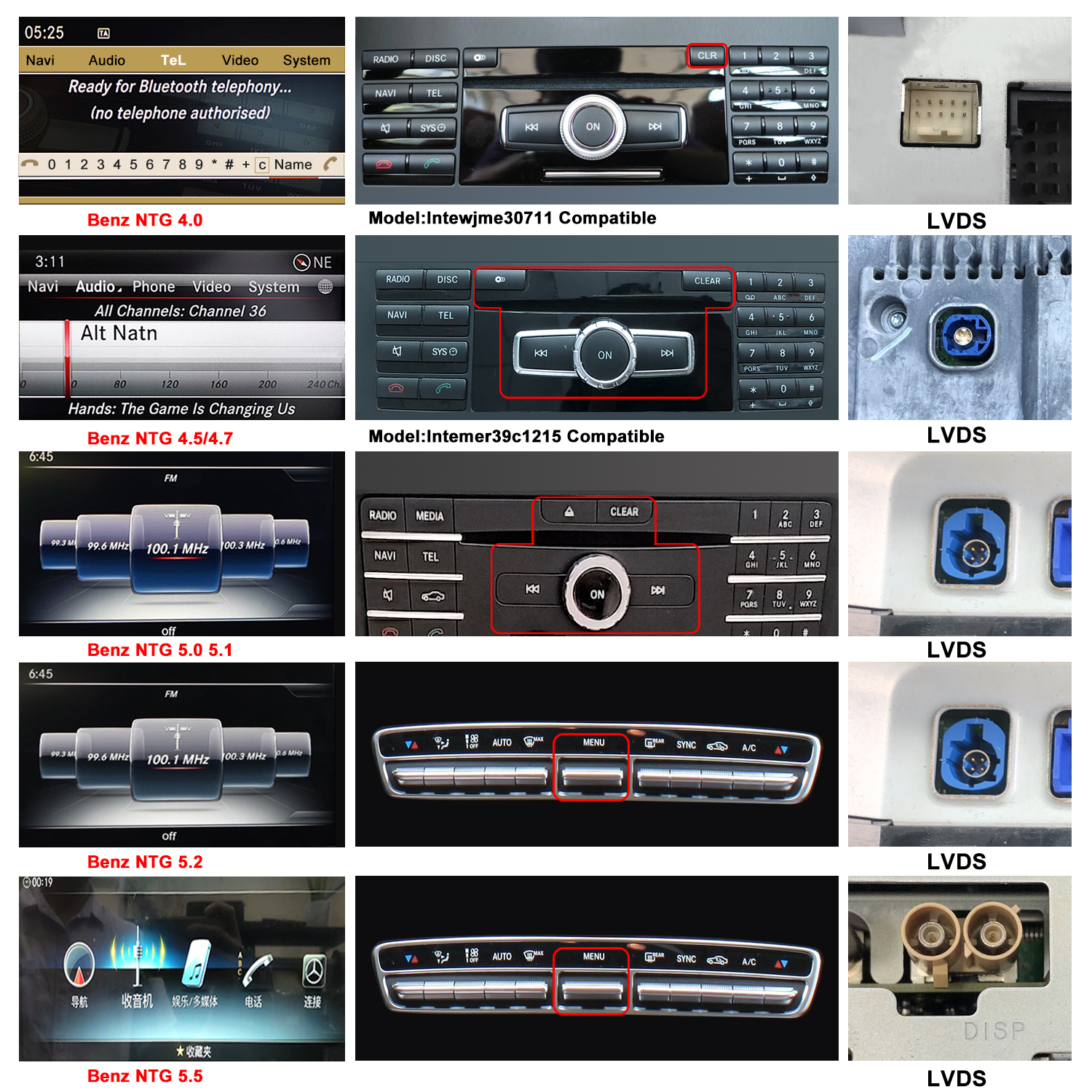
Not sure which NTG system your Mercedes-Benz has? This guide explains how to identify your Mercedes NTG version using the vehicle production year, COMAND menu, CD panel, LVDS connector and VIN.
Correctly identifying the original NTG system is important before purchasing an Android screen, CarPlay interface or other multimedia upgrade for your Mercedes-Benz.
What Is the Mercedes-Benz NTG System?
NTG stands for New Telematics Generation. It is the name commonly used for different generations of the Mercedes-Benz COMAND infotainment system.
Depending on the vehicle model, production year and original configuration, a Mercedes-Benz may use NTG 2.5, NTG 3.0, NTG 4.0, NTG 4.5, NTG 5.0, NTG 5.5 or another system version.
Different NTG versions may have different menus, screen sizes, connectors, control panels and software configurations.
Why Do You Need to Confirm the NTG Version?
The original NTG version can affect the compatibility of an aftermarket Android screen or CarPlay upgrade, including:
- Cable and wiring-harness connections
- LVDS connector type
- Original screen size and resolution
- Software and firmware configuration
- Factory audio-system compatibility
- Original COMAND and steering-wheel controls
Choosing a product designed for the wrong NTG version may cause compatibility problems, such as no sound, no original display, incorrect screen resolution or unavailable factory controls.
How to Identify Your Mercedes NTG Version
You can check your Mercedes NTG version in several ways. For a more reliable result, compare more than one of the following:
- Vehicle model and production year
- Original COMAND menu design
- Radio and CD control panel
- LVDS connector behind the original screen
- Vehicle identification number (VIN)
Method 1: Check the Vehicle Production Year
The production year can provide an initial indication of the NTG generation. The following production periods are approximate references only:
| NTG version | Approximate production period |
|---|---|
| NTG 1.0 / 2.0 | 2002–2009 |
| NTG 2.5 | 2009–2011 |
| NTG 3.0 / 3.5 | 2005–2013 |
| NTG 4.0 / 4.5 | 2011–2015 |
| NTG 5.0 / 5.1 | 2014–2018 |
| NTG 6.0 | From approximately 2018 |
These dates should only be used as a preliminary reference. Always check the original menu, control panel and connectors before ordering a replacement screen.
Method 2: Check the COMAND Menu, CD Panel and LVDS Connector
The appearance of the original COMAND menu and CD control panel can help distinguish between NTG 4.0, NTG 4.5, NTG 5.0 and other Mercedes-Benz NTG systems.
You can also check the shape and colour of the LVDS connector behind the factory screen. Connector types may differ between NTG generations.
Example: Mercedes-Benz W204 and W212
For example, Mercedes-Benz W204 and W212 vehicles may be equipped with different NTG systems depending on their production year and factory configuration.
If you own a W204 or W212, do not identify the NTG version from the chassis code or production year alone. Compare the following information:
- The appearance of the original COMAND menu
- The layout of the radio and CD control panel
- The shape and colour of the LVDS connector
If you are still unsure, send us photos of the original menu and CD panel. These visual details usually provide a more reliable identification than the vehicle year alone.
Method 3: Check the Mercedes NTG Version by VIN
A VIN decoder may provide information about the vehicle’s original multimedia equipment and factory option codes.
However, some VIN-decoder reports may not display the NTG version directly. Therefore, the VIN should be used as supporting information together with photos of the original menu, CD panel and connectors.
Frequently Asked Questions
Which NTG system does my Mercedes-Benz have?
Start by checking the vehicle model and production year. Then compare the original COMAND menu, CD panel and LVDS connector. Because NTG versions can overlap between production years, using several identification methods provides a more reliable result.
Is the production year enough to identify the NTG version?
No. The production year is only a preliminary reference. Mercedes-Benz vehicles produced during the same period may have different systems depending on the model, market and factory configuration.
Can I identify the Mercedes NTG version using the VIN?
A VIN decoder may show relevant multimedia equipment or factory option codes, but it may not always state the exact NTG version. Confirm the result by checking the original menu and control panel.
What happens if I order a screen for the wrong NTG system?
The cable connections, LVDS interface, screen configuration or software may be incompatible. This can cause problems such as no sound, no original display or unavailable factory controls.
Still Not Sure Which Mercedes NTG System You Have?
If you cannot identify the system from the information above, our support team can help confirm compatibility before you place an order.
Please send us:
- Your Mercedes-Benz model and chassis code
- The vehicle production year
- A clear photo of the original COMAND menu
- A photo of the radio and CD control panel
- A photo of the LVDS connector, if available
Email: harvie@ugode.com